skynet源码学习(粗略版)
本文从skynet的main入口开始,梳理skynet运行流程,中间很多东西不会解释,必要的一些细节还是会解释滴,旨在梳理清楚skynet如何工作、启动skynet项目,发生了什么?后续将带着以下问题开始。
- skynet服务如何工作?skynet服务是什么?
- 服务之间如何传递信息?
- 一个服务如何启动?
btw,本文需要有一定的c语言基础、lua基础以及较为重要的lua与c交互的相关知识。
main入口
main函数首先,检测了配置文件,配置节点,TSD,初始化skynet环境,设置信号量。
struct lua_State *L = luaL_newstate();
luaL_openlibs(L);   // link lua lib
int err =  luaL_loadbufferx(L, load_config, strlen(load_config), "=[skynet config]", "t");
assert(err == LUA_OK);
lua_pushstring(L, config_file);
err = lua_pcall(L, 1, 1, 0);
if (err) {
	fprintf(stderr,"%s\n",lua_tostring(L,-1));
	lua_close(L);
	return 1;
}

_init_env(L);
config.thread =  optint("thread",8);
config.module_path = optstring("cpath","./cservice/?.so");
config.harbor = optint("harbor", 1);
config.bootstrap = optstring("bootstrap","snlua bootstrap");
config.daemon = optstring("daemon", NULL);
config.logger = optstring("logger", NULL);
config.logservice = optstring("logservice", "logger");
config.profile = optboolean("profile", 1)
lua_close(L);
main中创建了一个lua栈,把配置文件的内容压入栈里,通过lua脚本,设置到skynet环境中。
#加载config的lua脚本
 static const char * load_config = "\
	local result = {}\n\
	local function getenv(name) return assert(os.getenv(name), [[os.getenv() failed: ]] .. name) end\n\
	local sep = package.config:sub(1,1)\n\
	local current_path = [[.]]..sep\n\
	local function include(filename)\n\
		local last_path = current_path\n\
		local path, name = filename:match([[(.*]]..sep..[[)(.*)$]])\n\
		if path then\n\
			if path:sub(1,1) == sep then	-- root\n\
				current_path = path\n\
			else\n\
				current_path = current_path .. path\n\
			end\n\
		else\n\
			name = filename\n\
		end\n\
		local f = assert(io.open(current_path .. name))\n\
		local code = assert(f:read [[*a]])\n\
		code = string.gsub(code, [[%$([%w_%d]+)]], getenv)\n\
		f:close()\n\
		assert(load(code,[[@]]..filename,[[t]],result))()\n\
		current_path = last_path\n\
	end\n\
	setmetatable(result, { __index = { include = include } })\n\
	local config_name = ...\n\
	include(config_name)\n\
	setmetatable(result, nil)\n\
	return result\n\
";
后续就可以通过skynet环境读取到配置文件的信息啦。
config.thread =  optint("thread",8);
config.module_path = optstring("cpath","./cservice/?.so");
config.harbor = optint("harbor", 1);
config.bootstrap = optstring("bootstrap","snlua bootstrap");
config.daemon = optstring("daemon", NULL);
config.logger = optstring("logger", NULL);
config.logservice = optstring("logservice", "logger");
config.profile = optboolean("profile", 1);我们拿config.thread = optint("thread",8);举例,后面optstring都是类似的。
static int
optint(const char *key, int opt) {
	const char * str = skynet_getenv(key);
	//如果配置文件没有配置这个key,就用默认的参数,在optint("thread",8)中就是8.
	if (str == NULL) {
		char tmp[20];
		sprintf(tmp,"%d",opt);
		skynet_setenv(key, tmp); //把默认的参数写入skynet环境中。
		return opt;
	}
	return strtol(str, NULL, 10);//配置文件中有key的配置,把字符串转int值返回。
}
加载完配置文件后,会关闭临时用的lua栈,然后来到最重要的环节----根据配置,启动skynet。
skynet_start(&config);// <==我们主要通过这个,就可以知道skynet的启动流程了
skynet_globalexit();
启动流程
skynet_start中,首先也注册了信号量,紧接着检测是否设置为守护进程。
后面的部分,才是我们主要分析的地方。
这个函数首先进行了节点、handle、消息队列、模块、定时器、socket的初始化以及开启性能分析。
skynet_harbor_init(config->harbor);
skynet_handle_init(config->harbor);
skynet_mq_init();
skynet_module_init(config->module_path);
skynet_timer_init();
skynet_socket_init();
skynet_profile_enable(config->profile);
我们知道skynet中服务地址的构成。高八位是节点地址,低24位是服务地址。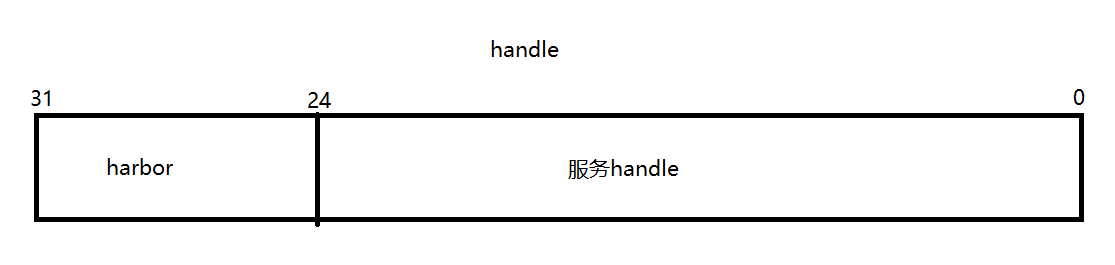
而skynet_harbor_init仅仅只做了一件事,把高8位设置为配置文件的节点号。
void
skynet_harbor_init(int harbor) {
	HARBOR = (unsigned int)harbor << HANDLE_REMOTE_SHIFT;
}在skynet_handle_init中主要为了,初始化一张全局handle操作的地址表H。skynet_mq_init中创建一个全局队列。skynet_module_init中创建了一个全局模块表,这样可以避免模块重复加载等等。
struct modules {
	int count;
	struct spinlock lock;
	const char * path;
	struct skynet_module m[MAX_MODULE_TYPE];
};skynet_timer_init中创建了一个全局定时器,用于更新时间。skynet_socket_init中根据定时器提供的当前时间创建了一个socket_server,用与管理socket相关操作。
接下来skynet启动了第一个服务——日志服务。
struct skynet_context *ctx = skynet_context_new(config->logservice, config->logger);
if (ctx == NULL) {
	fprintf(stderr, "Can't launch %s service\n", config->logservice);
	exit(1);
}

skynet_handle_namehandle(skynet_context_handle(ctx), "logger");
我们主要分析skynet_context_new这个函数,而skynet_handle_namehandle函数非常简单,它的作用是给服务起个名字,并插入到handle全局表H中,这里不过多展开了。
skynet_context_new函数首先会查询服务的模块名。
struct skynet_module * mod = skynet_module_query(name);

if (mod == NULL)
	return NULL;
//skynet_module_query
这里需要分析一下mod 查询函数
struct skynet_module *
skynet_module_query(const char * name) {
	// _query会去全局模块表M中找,看之前是否打开过该模块。如果打开过直接返回。
	struct skynet_module * result = _query(name);
	if (result)
		return result;

	SPIN_LOCK(M)

	result = _query(name); // double check
	//如果之前没有打开过,会去设置的模块路径中查找对应的模块,进行打开。
	if (result == NULL && M->count < MAX_MODULE_TYPE) {
		int index = M->count;
		void * dl = _try_open(M,name);
		if (dl) {
			M->m[index].name = name;
			M->m[index].module = dl;

			if (open_sym(&M->m[index]) == 0) {
				M->m[index].name = skynet_strdup(name);
				M->count ++;
				result = &M->m[index];
			}
		}
	}

	SPIN_UNLOCK(M)
	//打开成功返回skynet_module*,否则是NULL
	return result;
}
模块打开后,会对模块实例化。
void *inst = skynet_module_instance_create(mod);
if (inst == NULL)
	return NULL;
struct skynet_context * ctx = skynet_malloc(sizeof(*ctx));
实例化会调用模块中的回调函数。
void *
skynet_module_instance_create(struct skynet_module *m) {
	if (m->create) {
		return m->create();
	} else {
		return (void *)(intptr_t)(~0);
	}
}这里有一个问题,这个回调函数m->create()怎么来的。
这个回调函数的绑定是在查询阶段调用open_sym函数实现的。
static void *
get_api(struct skynet_module *mod, const char *api_name) {
	size_t name_size = strlen(mod->name);
	size_t api_size = strlen(api_name);
	char tmp[name_size + api_size + 1];
	memcpy(tmp, mod->name, name_size);
	memcpy(tmp+name_size, api_name, api_size+1);
	char *ptr = strrchr(tmp, '.');
	if (ptr == NULL) {
		ptr = tmp;
	} else {
		ptr = ptr + 1;
	}
	return dlsym(mod->module, ptr);
}

static int
open_sym(struct skynet_module *mod) {
	mod->create = get_api(mod, "_create");
	mod->init = get_api(mod, "_init");
	mod->release = get_api(mod, "_release");
	mod->signal = get_api(mod, "_signal");
	return mod->init == NULL;
}
接着回到服务的创建函数,下面都是对服务的初始化。
ctx->mod = mod;
ctx->instance = inst;
ATOM_INIT(&ctx->ref , 2);
ctx->cb = NULL;
ctx->cb_ud = NULL;
ctx->session_id = 0;
ATOM_INIT(&ctx->logfile, (uintptr_t)NULL);

ctx->init = false;
ctx->endless = false;

ctx->cpu_cost = 0;
ctx->cpu_start = 0;
ctx->message_count = 0;
ctx->profile = G_NODE.profile;
// Should set to 0 first to avoid skynet_handle_retireall get an uninitialized handle
ctx->handle = 0;
ctx->handle = skynet_handle_register(ctx); //注册一个handle地址
紧接着重点来了,服务创建了一个消息队列,并调用模块的初始化函数,对其进行初始化,如果初始化成功,就把这个服务的消息队列推入skynet的全局中并返回ctx,否则创建服务失败,释放相关资源。
struct message_queue * queue = ctx->queue = skynet_mq_create(ctx->handle);
// init function maybe use ctx->handle, so it must init at last
context_inc();

CHECKCALLING_BEGIN(ctx)
int r = skynet_module_instance_init(mod, inst, ctx, param);
CHECKCALLING_END(ctx)
if (r == 0) {
	struct skynet_context * ret = skynet_context_release(ctx);
	if (ret) {
		ctx->init = true;
	}
	skynet_globalmq_push(queue);
	if (ret) {
		skynet_error(ret, "LAUNCH %s %s", name, param ? param : "");
	}
	return ret;
} else {
	skynet_error(ctx, "FAILED launch %s", name);
	uint32_t handle = ctx->handle;
	skynet_context_release(ctx);
	skynet_handle_retire(handle);
	struct drop_t d = { handle };
	skynet_mq_release(queue, drop_message, &d);
	return NULL;
}
这里的函数都不难理解,就不做展开了。
到这里一个服务就创建好了,可以得到结论,服务其实就是一个skynet_context结构体。
接下来到了bootstrap(ctx, config->bootstrap);这步,这步的作用是启动的服务,这行代码,连接lua层,比较难,放到最后再说,不妨先理解为启动其他服务。
线程创建
在各个服务都创建好后,到了start(config->thread);,就开始创建服务的处理线程了。
这里要先用几个图解释一下。
当服务创建好后,它的消息队列会push到skynet全局队列GQ中。
而服务本身有一个skynet_message队列,这个队列是存放其他服务发的消息的。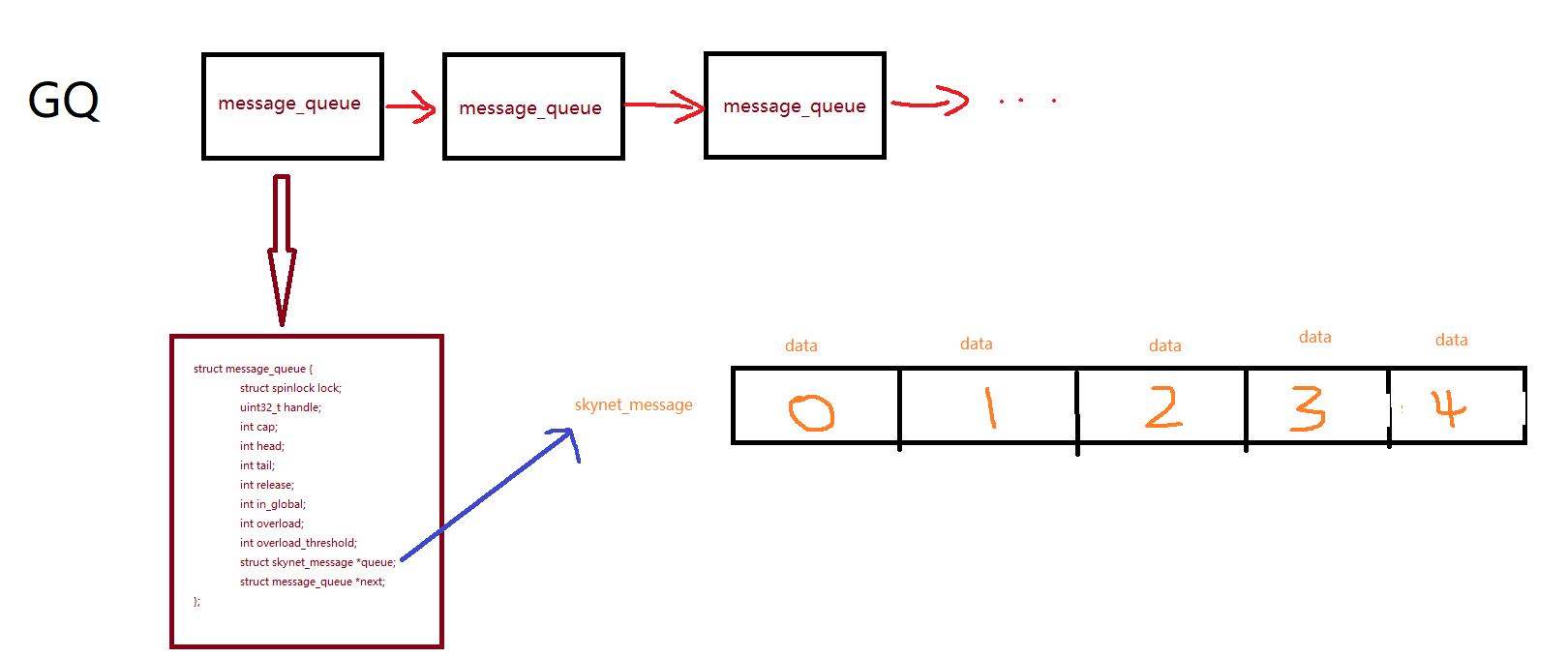
全局队列中的每个消息队列对应一个服务,而其他服务发送需要处理的消息在消息队列中的skynet_message队列中。需要注意的是,全局队列是链表的形式,而skynet_message队列是数组循环队列。
start(config->thread);会创建很多工作线程,这些工作线程从GQ中,抢消息队列,如果消息队列中有消息,就用消息队列对应服务的回调函数处理这条消息。
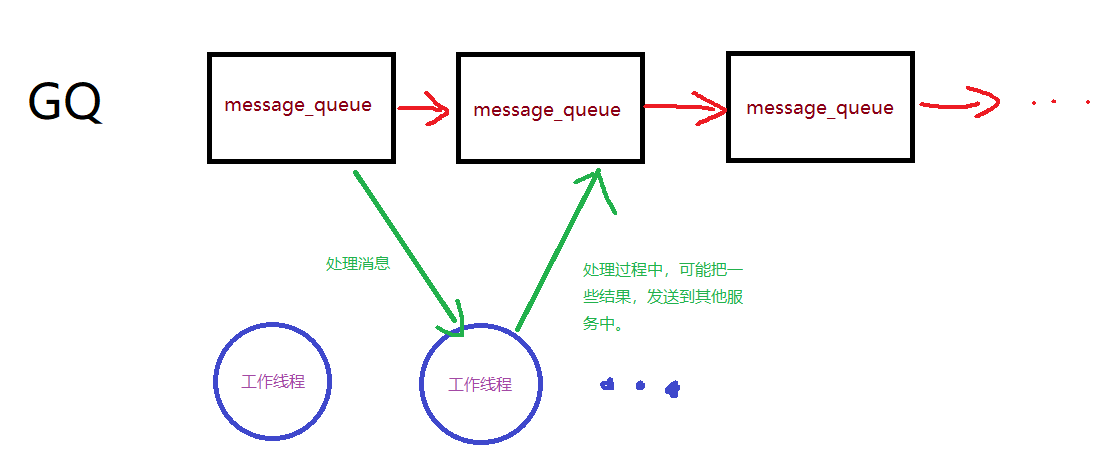
下面开始从源码分析这些线程是怎么创建与工作的。
在创建这些工作线程之前,先创建了监视器、定时器、socket三个线程,而监视器线程中有与工作线程数量对应的skynet_monitor监视器。
这里的在创建定时器和socket线程时也传入了监视器实例,主要目的是为了通过监视器实例来控制工作线程。
pthread_t pid[thread+3];

struct monitor *m = skynet_malloc(sizeof(*m));
memset(m, 0, sizeof(*m));
m->count = thread;
m->sleep = 0;

m->m = skynet_malloc(thread * sizeof(struct skynet_monitor *));
int i;
for (i=0;i<thread;i++) {
	m->m[i] = skynet_monitor_new();
}
if (pthread_mutex_init(&m->mutex, NULL)) {
	fprintf(stderr, "Init mutex error");
	exit(1);
}
if (pthread_cond_init(&m->cond, NULL)) {
	fprintf(stderr, "Init cond error");
	exit(1);
}

create_thread(&pid[0], thread_monitor, m);
create_thread(&pid[1], thread_timer, m);
create_thread(&pid[2], thread_socket, m);
而后才创建了工作线程,在创建工作线程时,对每个线程附加了权重还传入了对应的skynet_monitor监视器。这个权重稍后解释。
static int weight[] = {
	-1, -1, -1, -1, 0, 0, 0, 0,
	1, 1, 1, 1, 1, 1, 1, 1,
	2, 2, 2, 2, 2, 2, 2, 2,
	3, 3, 3, 3, 3, 3, 3, 3, };
struct worker_parm wp[thread];
for (i=0;i<thread;i++) {
	wp[i].m = m;
	wp[i].id = i;
	if (i < sizeof(weight)/sizeof(weight[0])) {
		wp[i].weight= weight[i];
	} else {
		wp[i].weight = 0;
	}
	create_thread(&pid[i+3], thread_worker, &wp[i]);
}

for (i=0;i<thread+3;i++) {
	pthread_join(pid[i], NULL);
}
不妨看看thread_worker做了什么。
首先通过获取权重,并通过全局监视器获取skynet_monitor监视器。当监视器没有离开时,重复循环。
static void *
thread_worker(void *p) {
	struct worker_parm *wp = p;
	int id = wp->id;
	int weight = wp->weight;
	struct monitor *m = wp->m;
	struct skynet_monitor *sm = m->m[id];
	skynet_initthread(THREAD_WORKER);
	struct message_queue * q = NULL;
	while (!m->quit) {
		q = skynet_context_message_dispatch(sm, q, weight);
		if (q == NULL) {
			if (pthread_mutex_lock(&m->mutex) == 0) {
				++ m->sleep;
				// "spurious wakeup" is harmless,
				// because skynet_context_message_dispatch() can be call at any time.
				if (!m->quit)
					pthread_cond_wait(&m->cond, &m->mutex);
				-- m->sleep;
				if (pthread_mutex_unlock(&m->mutex)) {
					fprintf(stderr, "unlock mutex error");
					exit(1);
				}
			}
		}
	}
	return NULL;
}其中skynet_context_message_dispatch函数是关键。
这个函数首先从全局队列GQ中获取消息队列。然后从消息队列中获取handle,再从handle中获取到服务上下文。
if (q == NULL) {
	q = skynet_globalmq_pop();
	if (q==NULL)
		return NULL;
}
uint32_t handle = skynet_mq_handle(q);

struct skynet_context * ctx = skynet_handle_grab(handle);
if (ctx == NULL) {
	struct drop_t d = { handle };
	skynet_mq_release(q, drop_message, &d);
	return skynet_globalmq_pop();
}
之后就是对消息队列中skynet_message队列进行处理,这里可以知道,权重的作用。
| 权重 | 消息处理数量 |
|---|---|
| -1 | 1条 |
| 0 | 全部消息 |
| 1 | 一半消息 |
| 2 | 1/4消息 |
| 3 | 1/8消息 |
int i,n=1;
struct skynet_message msg;

for (i=0;i<n;i++) {
	if (skynet_mq_pop(q,&msg)) {
		skynet_context_release(ctx);
		return skynet_globalmq_pop();
	} else if (i==0 && weight >= 0) {
		n = skynet_mq_length(q);
		n >>= weight;
	}
	int overload = skynet_mq_overload(q);
	if (overload) {
		skynet_error(ctx, "May overload, message queue length = %d", overload);
	}

	skynet_monitor_trigger(sm, msg.source , handle);

	if (ctx->cb == NULL) {
		skynet_free(msg.data);
	} else {
		dispatch_message(ctx, &msg);
	}

	skynet_monitor_trigger(sm, 0,0);
}
这里的监视器触发函数skynet_monitor_trigger,主要是为了防止服务死循环。
void
skynet_monitor_trigger(struct skynet_monitor *sm, uint32_t source, uint32_t destination) {
	sm->source = source;
	sm->destination = destination;
	ATOM_FINC(&sm->version);
}

void
skynet_monitor_check(struct skynet_monitor *sm) {
	if (sm->version == sm->check_version) {
		if (sm->destination) {
			skynet_context_endless(sm->destination);
			skynet_error(NULL, "A message from [ :%08x ] to [ :%08x ] maybe in an endless loop (version = %d)", sm->source , sm->destination, sm->version);
		}
	} else {
		sm->check_version = sm->version;
	}
}在监视器线程中,会不断检查工作线程的skynet_monitor。
static void *
thread_monitor(void *p) {
	struct monitor * m = p;
	int i;
	int n = m->count;
	skynet_initthread(THREAD_MONITOR);
	for (;;) {
		CHECK_ABORT
		for (i=0;i<n;i++) {
			skynet_monitor_check(m->m[i]);
		}
		for (i=0;i<5;i++) {
			CHECK_ABORT
			sleep(1);
		}
	}

	return NULL;
}再次回到工作线程中的skynet_context_message_dispatch函数,在服务有注册回调函数时,会调用dispatch_message进行处理,而这个函数会调用服务的回调进行消息处理。
static void
dispatch_message(struct skynet_context *ctx, struct skynet_message *msg) {
	assert(ctx->init);
	CHECKCALLING_BEGIN(ctx)
	pthread_setspecific(G_NODE.handle_key, (void *)(uintptr_t)(ctx->handle));
	int type = msg->sz >> MESSAGE_TYPE_SHIFT;
	size_t sz = msg->sz & MESSAGE_TYPE_MASK;
	FILE *f = (FILE *)ATOM_LOAD(&ctx->logfile);
	if (f) {
		skynet_log_output(f, msg->source, type, msg->session, msg->data, sz);
	}
	++ctx->message_count;
	int reserve_msg;
	if (ctx->profile) {
		ctx->cpu_start = skynet_thread_time();
		reserve_msg = ctx->cb(ctx, ctx->cb_ud, type, msg->session, msg->source, msg->data, sz);
		uint64_t cost_time = skynet_thread_time() - ctx->cpu_start;
		ctx->cpu_cost += cost_time;
	} else {
		reserve_msg = ctx->cb(ctx, ctx->cb_ud, type, msg->session, msg->source, msg->data, sz);
	}
	if (!reserve_msg) {
		skynet_free(msg->data);
	}
	CHECKCALLING_END(ctx)
}
如此,服务如何运行的问题就基本解决了。就是通过这些工作线程不断从GQ中获取服务的消息队列,再调用服务注册的回调函数处理消息。
让我们回到bootstrap(ctx, config->bootstrap);服务启动这部分。
服务启动
bootstrap函数如下,举个例子,传入的是默认参数日志服务和snlua bootstrap
static void
bootstrap(struct skynet_context * logger, const char * cmdline) {
	int sz = strlen(cmdline);
	char name[sz+1];
	char args[sz+1];
	int arg_pos;
	sscanf(cmdline, "%s", name);
	arg_pos = strlen(name);
	if (arg_pos < sz) {
		while(cmdline[arg_pos] == ' ') {
			arg_pos++;
		}
		strncpy(args, cmdline + arg_pos, sz);
	} else {
		args[0] = '\0';
	}
	struct skynet_context *ctx = skynet_context_new(name, args);
	if (ctx == NULL) {
		skynet_error(NULL, "Bootstrap error : %s\n", cmdline);
		skynet_context_dispatchall(logger);
		exit(1);
	}
}这个函数会执行struct skynet_context *ctx = skynet_context_new("snlua", "bootstrap");创建一个snlua服务。
snlua全名是skynet lua,它是作者自定义的lua虚拟机。
创建时,会建一个lua栈,并初始化变量。
struct snlua {
	lua_State * L;
	struct skynet_context * ctx;
	size_t mem;
	size_t mem_report;
	size_t mem_limit;
	lua_State * activeL;
	ATOM_INT trap;
};
struct snlua *
snlua_create(void) {
	struct snlua * l = skynet_malloc(sizeof(*l));
	memset(l,0,sizeof(*l));
	l->mem_report = MEMORY_WARNING_REPORT;
	l->mem_limit = 0;
	l->L = lua_newstate(lalloc, l);
	l->activeL = NULL;
	ATOM_INIT(&l->trap , 0);
	return l;
}
int

snlua_init(struct snlua *l, struct skynet_context *ctx, const char * args) {
	int sz = strlen(args);
	char * tmp = skynet_malloc(sz);
	memcpy(tmp, args, sz);
	skynet_callback(ctx, l , launch_cb);
	const char * self = skynet_command(ctx, "REG", NULL);
	uint32_t handle_id = strtoul(self+1, NULL, 16);
	// it must be first message
	skynet_send(ctx, 0, handle_id, PTYPE_TAG_DONTCOPY,0, tmp, sz);
	return 0;
}这个服务的重点在于初始化操作,它首先通过skynet_callback函数设置了自己的回调函数为launch_cb,还拿具体例子,这个参数是默认参数"bootstrap"。const char * self = skynet_command(ctx, "REG", NULL);这段代码如果最后的参数会NULL或\0返回服务的handle,如果.name则给服务注册名字。
而uint32_t handle_id = strtoul(self+1, NULL, 16);这里的self+1是因为self是16进制字符串,第一位是:。
最后向自己发一条消息,让工作线程去处理它。
static struct command_func cmd_funcs[] = {
	{ "TIMEOUT", cmd_timeout },
	{ "REG", cmd_reg },
	{ "QUERY", cmd_query },
	{ "NAME", cmd_name },
	{ "EXIT", cmd_exit },
	{ "KILL", cmd_kill },
	{ "LAUNCH", cmd_launch },
	{ "GETENV", cmd_getenv },
	{ "SETENV", cmd_setenv },
	{ "STARTTIME", cmd_starttime },
	{ "ABORT", cmd_abort },
	{ "MONITOR", cmd_monitor },
	{ "STAT", cmd_stat },
	{ "LOGON", cmd_logon },
	{ "LOGOFF", cmd_logoff },
	{ "SIGNAL", cmd_signal },
	{ NULL, NULL },
};

const char *
skynet_command(struct skynet_context * context, const char * cmd , const char * param) {
	struct command_func * method = &cmd_funcs[0];
	while(method->name) {
		if (strcmp(cmd, method->name) == 0) {
			return method->func(context, param);
		}
		++method;
	}

	return NULL;
}

static const char *
cmd_reg(struct skynet_context * context, const char * param) {
	if (param == NULL || param[0] == '\0') {
		sprintf(context->result, ":%x", context->handle);
		return context->result;
	} else if (param[0] == '.') {
		return skynet_handle_namehandle(context->handle, param + 1);
	} else {
		skynet_error(context, "Can't register global name %s in C", param);
		return NULL;
	}
}
当工作线程拿到这条信息时,就会回调launch_cb函数,这里有把snlua服务的回调函数设置为NULL了,这是因为snlua只进行一次运行初始化即可,这里设置为NULL,可以保护服务初始化,而后续会把回调设置成其他。
static int
launch_cb(struct skynet_context * context, void *ud, int type, int session, uint32_t source , const void * msg, size_t sz) {
	assert(type == 0 && session == 0);
	struct snlua *l = ud;
	skynet_callback(context, NULL, NULL);
	int err = init_cb(l, context, msg, sz);
	if (err) {
		skynet_command(context, "EXIT", NULL);
	}

	return 0;
}继续调用init_cb,这是snlua的核心,它通过lua与c的交互,设置了环境,为了统计时间,重置了协程函数,同时设置了lua寻找模块的路径。
static int
init_cb(struct snlua *l, struct skynet_context *ctx, const char * args, size_t sz) {
	lua_State *L = l->L;
	l->ctx = ctx;
	lua_gc(L, LUA_GCSTOP, 0);
	lua_pushboolean(L, 1);  /* signal for libraries to ignore env. vars. */
	lua_setfield(L, LUA_REGISTRYINDEX, "LUA_NOENV");
	luaL_openlibs(L);
	luaL_requiref(L, "skynet.profile", init_profile, 0);

	int profile_lib = lua_gettop(L);
	// replace coroutine.resume / coroutine.wrap
	lua_getglobal(L, "coroutine");
	lua_getfield(L, profile_lib, "resume");
	lua_setfield(L, -2, "resume");
	lua_getfield(L, profile_lib, "wrap");
	lua_setfield(L, -2, "wrap");

	lua_settop(L, profile_lib-1);

	lua_pushlightuserdata(L, ctx);
	lua_setfield(L, LUA_REGISTRYINDEX, "skynet_context");
	luaL_requiref(L, "skynet.codecache", codecache , 0);
	lua_pop(L,1);

	lua_gc(L, LUA_GCGEN, 0, 0);

	const char *path = optstring(ctx, "lua_path","./lualib/?.lua;./lualib/?/init.lua");
	lua_pushstring(L, path);
	lua_setglobal(L, "LUA_PATH");
	const char *cpath = optstring(ctx, "lua_cpath","./luaclib/?.so");
	lua_pushstring(L, cpath);
	lua_setglobal(L, "LUA_CPATH");
	const char *service = optstring(ctx, "luaservice", "./service/?.lua");
	lua_pushstring(L, service);
	lua_setglobal(L, "LUA_SERVICE");
	const char *preload = skynet_command(ctx, "GETENV", "preload");
	lua_pushstring(L, preload);
	lua_setglobal(L, "LUA_PRELOAD");

	lua_pushcfunction(L, traceback);
	assert(lua_gettop(L) == 1);

	const char * loader = optstring(ctx, "lualoader", "./lualib/loader.lua");

	int r = luaL_loadfile(L,loader);
	if (r != LUA_OK) {
		skynet_error(ctx, "Can't load %s : %s", loader, lua_tostring(L, -1));
		report_launcher_error(ctx);
		return 1;
	}
	lua_pushlstring(L, args, sz);
	r = lua_pcall(L,1,0,1);
	if (r != LUA_OK) {
		skynet_error(ctx, "lua loader error : %s", lua_tostring(L, -1));
		report_launcher_error(ctx);
		return 1;
	}
	lua_settop(L,0);
	if (lua_getfield(L, LUA_REGISTRYINDEX, "memlimit") == LUA_TNUMBER) {
		size_t limit = lua_tointeger(L, -1);
		l->mem_limit = limit;
		skynet_error(ctx, "Set memory limit to %.2f M", (float)limit / (1024 * 1024));
		lua_pushnil(L);
		lua_setfield(L, LUA_REGISTRYINDEX, "memlimit");
	}
	lua_pop(L, 1);

	lua_gc(L, LUA_GCRESTART, 0);

	return 0;
}
这其中最重要是下面段代码。这段代码首先加载了loader.lua这个lua服务加载器,利用这个加载器去加载lua服务。
//获取loader.lua的路径
const char * loader = optstring(ctx, "lualoader", "./lualib/loader.lua");
//加载loader.lua,r是加载结果
int r = luaL_loadfile(L,loader);
if (r != LUA_OK) {
	skynet_error(ctx, "Can't load %s : %s", loader, lua_tostring(L, -1));
	report_launcher_error(ctx);
	return 1;
}
//把参数bootstrap压入栈中,准备传入loader中
lua_pushlstring(L, args, sz);
//加载bootstrap服务。
r = lua_pcall(L,1,0,1);
if (r != LUA_OK) {
	skynet_error(ctx, "lua loader error : %s", lua_tostring(L, -1));
	report_launcher_error(ctx);
	return 1;
}如下是loader.lua的代码,第一部分,是找到对应服务文件,并加载它。第二部分是设置lua的包寻找路径,最后调用main函数启动这个服务。
local args = {}
for word in string.gmatch(..., "%S+") do
	table.insert(args, word)
end

SERVICE_NAME = args[1]

local main, pattern

local err = {}
for pat in string.gmatch(LUA_SERVICE, "([^;]+);*") do
	local filename = string.gsub(pat, "?", SERVICE_NAME)
	local f, msg = loadfile(filename)
	if not f then
		table.insert(err, msg)
	else
		pattern = pat
		main = f
		break
	end
end

if not main then
	error(table.concat(err, "\n"))
end

LUA_SERVICE = nil
package.path , LUA_PATH = LUA_PATH
package.cpath , LUA_CPATH = LUA_CPATH

local service_path = string.match(pattern, "(.*/)[^/?]+$")

if service_path then
	service_path = string.gsub(service_path, "?", args[1])
	package.path = service_path .. "?.lua;" .. package.path
	SERVICE_PATH = service_path
else
	local p = string.match(pattern, "(.*/).+$")
	SERVICE_PATH = p
end

if LUA_PRELOAD then
	local f = assert(loadfile(LUA_PRELOAD))
	f(table.unpack(args))
	LUA_PRELOAD = nil
end

_G.require = (require "skynet.require").require

main(select(2, table.unpack(args)))
然后我们从lua层反过来看,还用上例bootstrap这个服务,服务代码如下。
local skynet = require "skynet"
local harbor = require "skynet.harbor"
local service = require "skynet.service"
require "skynet.manager"	-- import skynet.launch, ...

skynet.start(function()
	local standalone = skynet.getenv "standalone"

	local launcher = assert(skynet.launch("snlua","launcher"))
	skynet.name(".launcher", launcher)

	local harbor_id = tonumber(skynet.getenv "harbor" or 0)
	if harbor_id == 0 then
		assert(standalone ==  nil)
		standalone = true
		skynet.setenv("standalone", "true")

		local ok, slave = pcall(skynet.newservice, "cdummy")
		if not ok then
			skynet.abort()
		end
		skynet.name(".cslave", slave)

	else
		if standalone then
			if not pcall(skynet.newservice,"cmaster") then
				skynet.abort()
			end
		end

		local ok, slave = pcall(skynet.newservice, "cslave")
		if not ok then
			skynet.abort()
		end
		skynet.name(".cslave", slave)
	end

	if standalone then
		local datacenter = skynet.newservice "datacenterd"
		skynet.name("DATACENTER", datacenter)
	end
	skynet.newservice "service_mgr"

	local enablessl = skynet.getenv "enablessl"
	if enablessl then
		service.new("ltls_holder", function ()
			local c = require "ltls.init.c"
			c.constructor()
		end)
	end

	pcall(skynet.newservice,skynet.getenv "start" or "main")
	skynet.exit()
end)
其中很重要的就是这个local launcher = assert(skynet.launch("snlua","launcher"))。
当我们去创建新服务,或者是初始化lua服务,都会给launcher这个服务发消息,它不仅仅充当着启动器的角色。
function skynet.init_service(start)
	local function main()
		skynet_require.init_all()
		start()
	end
	local ok, err = xpcall(main, traceback)
	if not ok then
		skynet.error("init service failed: " .. tostring(err))
		skynet.send(".launcher","lua", "ERROR")
		skynet.exit()
	else
		skynet.send(".launcher","lua", "LAUNCHOK")
	end
end


function skynet.newservice(name, ...)
	return skynet.call(".launcher", "lua" , "LAUNCH", "snlua", name, ...)
end
而当创建新服务时,launcher服务会调用LAUNCH函数,然后再调用launch_service,而后又调用skynet.launch。
function command.LAUNCH(_, service, ...)

    launch_service(service, ...)

    return NORET

end
local function launch_service(service, ...)
	local param = table.concat({...}, " ")
	local inst = skynet.launch(service, param)
	local session = skynet.context()
	local response = skynet.response()
	if inst then
		services[inst] = service .. " " .. param
		instance[inst] = response
		launch_session[inst] = session
	else
		response(false)
		return
	end
	return inst
end

function skynet.launch(...)
	local addr = c.command("LAUNCH", table.concat({...}," "))
	if addr then
		return tonumber(string.sub(addr , 2), 16)
	end
end
而skynet.launch会调用skynet.core中的command,执行LAUNCH。会在cmd_launch函数中创建snlua加载类似于bootsrtap等lua服务。每个lua服务都会创建一个snlua虚拟机,lua服务之间形成沙盒,通过工作线程进行交互信息,信息在每个服务的结构体中,传递消息也仅仅是指针,这样的效率十分的高。
static struct command_func cmd_funcs[] = {
	{ "TIMEOUT", cmd_timeout },
	{ "REG", cmd_reg },
	{ "QUERY", cmd_query },
	{ "NAME", cmd_name },
	{ "EXIT", cmd_exit },
	{ "KILL", cmd_kill },
	{ "LAUNCH", cmd_launch },
	{ "GETENV", cmd_getenv },
	{ "SETENV", cmd_setenv },
	{ "STARTTIME", cmd_starttime },
	{ "ABORT", cmd_abort },
	{ "MONITOR", cmd_monitor },
	{ "STAT", cmd_stat },
	{ "LOGON", cmd_logon },
	{ "LOGOFF", cmd_logoff },
	{ "SIGNAL", cmd_signal },
	{ NULL, NULL },
};

const char *
skynet_command(struct skynet_context * context, const char * cmd , const char * param) {
	struct command_func * method = &cmd_funcs[0];
	while(method->name) {
		if (strcmp(cmd, method->name) == 0) {
			return method->func(context, param);
		}
		++method;
	}

	return NULL;
}

static const char *
cmd_launch(struct skynet_context * context, const char * param) {
	size_t sz = strlen(param);
	char tmp[sz+1];
	strcpy(tmp,param);
	char * args = tmp;
	char * mod = strsep(&args, " \t\r\n");
	args = strsep(&args, "\r\n");
	struct skynet_context * inst = skynet_context_new(mod,args);
	if (inst == NULL) {
		return NULL;
	} else {
		id_to_hex(context->result, inst->handle);
		return context->result;
	}
}
这就是lua服务的创建过程。
但是回到skynet.start这个函数中,服务启动时会先调用skynet.core中的callback函数。
function skynet.start(start_func)
	c.callback(skynet.dispatch_message)
	init_thread = skynet.timeout(0, function()
		skynet.init_service(start_func)
		init_thread = nil
	end)
end
callback函数对应lcommand函数,函数首先从 Lua 堆栈中获取服务上下文和一个布尔值 forward。然后,检查堆栈上的第一个参数是否是一个函数,这个函数就是要设置为回调函数的 Lua 函数。从结果上,lcommand最后一定会把之前设置为NULL的回调,设回成_cb。而这个函数的作用就是设置lua服务的回调函数。
	luaL_Reg l[] = {
		{ "send" , lsend },
		{ "genid", lgenid },
		{ "redirect", lredirect },
		{ "command" , lcommand },
		{ "intcommand", lintcommand },
		{ "addresscommand", laddresscommand },
		{ "error", lerror },
		{ "harbor", lharbor },
		{ "callback", lcallback },
		{ "trace", ltrace },
		{ NULL, NULL },
	};

static int
lcallback(lua_State *L) {
	struct skynet_context * context = lua_touserdata(L, lua_upvalueindex(1));
	int forward = lua_toboolean(L, 2);
	luaL_checktype(L,1,LUA_TFUNCTION);
	lua_settop(L,1);
	struct callback_context * cb_ctx = (struct callback_context *)lua_newuserdatauv(L, sizeof(*cb_ctx), 2);
	cb_ctx->L = lua_newthread(L);
	lua_pushcfunction(cb_ctx->L, traceback);
	lua_setiuservalue(L, -2, 1);
	lua_getfield(L, LUA_REGISTRYINDEX, "callback_context");
	lua_setiuservalue(L, -2, 2);
	lua_setfield(L, LUA_REGISTRYINDEX, "callback_context");
	lua_xmove(L, cb_ctx->L, 1);

	skynet_callback(context, cb_ctx, (forward)?(_forward_pre):(_cb_pre));
	return 0;
}

static int
_cb_pre(struct skynet_context * context, void * ud, int type, int session, uint32_t source, const void * msg, size_t sz) {
	struct callback_context *cb_ctx = (struct callback_context *)ud;
	clear_last_context(cb_ctx->L);
	skynet_callback(context, ud, _cb);
	return _cb(context, cb_ctx, type, session, source, msg, sz);
}

static int
_forward_pre(struct skynet_context *context, void *ud, int type, int session, uint32_t source, const void *msg, size_t sz) {
	struct callback_context *cb_ctx = (struct callback_context *)ud;
	clear_last_context(cb_ctx->L);
	skynet_callback(context, ud, forward_cb);
	return forward_cb(context, cb_ctx, type, session, source, msg, sz);
}
static int
forward_cb(struct skynet_context * context, void * ud, int type, int session, uint32_t source, const void * msg, size_t sz) {
	_cb(context, ud, type, session, source, msg, sz);
	// don't delete msg in forward mode.
	return 1;
}
在_cb中处理lua服务的数据。
static int
_cb(struct skynet_context * context, void * ud, int type, int session, uint32_t source, const void * msg, size_t sz) {
	struct callback_context *cb_ctx = (struct callback_context *)ud;
	lua_State *L = cb_ctx->L;
	int trace = 1;
	int r;
	lua_pushvalue(L,2);

	lua_pushinteger(L, type);
	lua_pushlightuserdata(L, (void *)msg);
	lua_pushinteger(L,sz);
	lua_pushinteger(L, session);
	lua_pushinteger(L, source);

	r = lua_pcall(L, 5, 0 , trace);

	if (r == LUA_OK) {
		return 0;
	}
	const char * self = skynet_command(context, "REG", NULL);
	switch (r) {
	case LUA_ERRRUN:
		skynet_error(context, "lua call [%x to %s : %d msgsz = %d] error : " KRED "%s" KNRM, source , self, session, sz, lua_tostring(L,-1));
		break;
	case LUA_ERRMEM:
		skynet_error(context, "lua memory error : [%x to %s : %d]", source , self, session);
		break;
	case LUA_ERRERR:
		skynet_error(context, "lua error in error : [%x to %s : %d]", source , self, session);
		break;
	};

	lua_pop(L,1);

	return 0;
}
目前就看到这里,在分析过程中,存在很多值得深入的细节,好在网上已经有很多资料,可以找到。再遇感兴趣点的时候,会再次更新。