linux服务器初始化(个人自用)
重置root密码
sudo passwd root

#为了以后省去sudo输入密码。
sudo visudo
#在文件最后加上
用户名 ALL=(ALL) NOPASSWD: ALL
安装vim并设置主编辑器
apt install vim -y
select-editor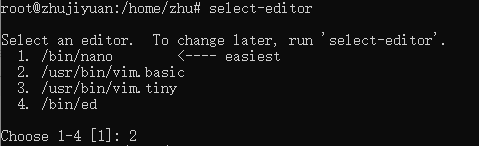
给vi起别名
echo "alias vi=vim" >> /etc/profile
source /etc/profile
修改apt的源
#先安装vim
sudo apt-get install vim -y
#好习惯,先备份原来的
cp /etc/apt/sources.list /etc/apt/sources.list.bak
sudo vim /etc/apt/sources.list

#把内容改成
 deb http://mirrors.aliyun.com/ubuntu/ focal main restricted universe multiverse
 deb-src http://mirrors.aliyun.com/ubuntu/ focal main restricted universe multiverse
 deb http://mirrors.aliyun.com/ubuntu/ focal-security main restricted universe multiverse
 deb-src http://mirrors.aliyun.com/ubuntu/ focal-security main restricted universe multiverse
 deb http://mirrors.aliyun.com/ubuntu/ focal-updates main restricted universe multiverse
 deb-src http://mirrors.aliyun.com/ubuntu/ focal-updates main restricted universe multiverse
 deb http://mirrors.aliyun.com/ubuntu/ focal-proposed main restricted universe multiverse
 deb-src http://mirrors.aliyun.com/ubuntu/ focal-proposed main restricted universe multiverse
 deb http://mirrors.aliyun.com/ubuntu/ focal-backports main restricted universe multiverse
 deb-src http://mirrors.aliyun.com/ubuntu/ focal-backports main restricted universe multiverse
更新软件列表
sudo apt update & apt upgrade安装python
其实这里主要是因为python的一些版本问题。如果没有问题,可跳过
sudo apt install python3
sudo apt install python3-pip
安装ssh & xrdp & firewalld
sudo apt install ssh

sudo apt install xrdp

sudo systemctl status xrdp
sudo adduser xrdp ssl-cert
sudo systemctl restart xrdp

sudo apt install firewalld